Getting Started
Step-by-step guide to integrate with the External Hospital API
Prerequisites
What you need before starting
- ✓ Hospital ID from your hospital admin
- ✓ Admin access credentials to create API keys
- ✓ Basic understanding of REST APIs and HTTP headers
- ✓ cURL, Postman, or your preferred API client
Step 1: Generate API Key from Dashboard
Access the NyraAI admin dashboard
Navigate to the NyraAI dashboard to generate your API key with required permissions.
Dashboard URL:
Log in to the dashboard
Use your hospital admin credentials
Click "Create API Key"
Select the permissions you need
Copy and save credentials
Save the key, secret, and token securely
📸 Dashboard Preview:
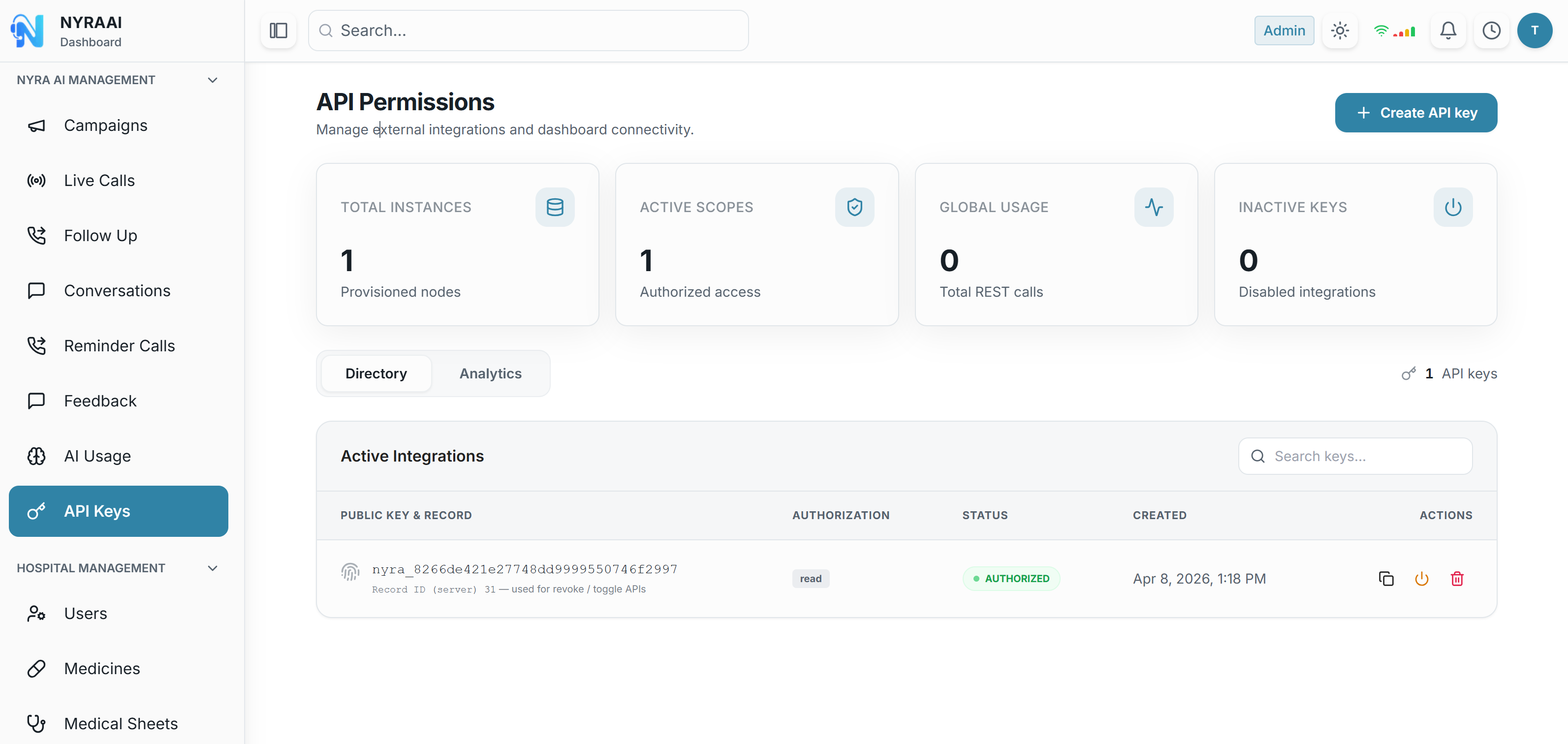
The API Permissions page shows your API keys, active scopes, and usage statistics. Click the blue "Create API Key" button in the top right to get started.
Step 2: Save Your Credentials
Store these securely from the dashboard
After creating your API key in the dashboard, you will receive three critical credentials. Store them securely:
{
  "success": true,
  "data": {
    "key": "nyra_2f9a1e2b3c4d5f6g7h8i",
    "secret": "aVeryLongBase64SecretStringThatShouldBeStoredSecurely...",
    "token": "a1b2c3d4e5f6789abcdef...",
    "id": "api-key-uuid-12345",
    "permissions": ["patients:create", "patients:read", "appointments:write"]
  },
  "message": "New API key and token generated successfully."
}
⚠️ Security Warning: The secret is shown only once! Save it immediately in a secure location (password manager, encrypted vault, etc.).
Use the returned token as the REST Authorization: Bearer value (hospital token from issuance). The JWT from POST /api/external/ws-ticket is only for WebSocket connections.
Step 3: Test Your API Key
Verify your credentials are working
Make a simple GET request to verify everything is working:
Test API Request
curl -X GET "https://server.nyraai.io/api/external/patients?limit=5" \
  -H "x-api-key: nyra_2f9a1e2b3c4d5f6g7h8i" \
  -H "x-api-secret: aVeryLongBase64SecretString..." \
  -H "Authorization: Bearer <hospital_token_from_key_issuance>"
If successful, you should receive a 200 OK response with patient data.
Step 4: Integrate into Your Application
Add the API to your code
Node.js / JavaScript Example
const apiKey = process.env.HOSPITAL_API_KEY;
const apiSecret = process.env.HOSPITAL_API_SECRET;
const apiToken = process.env.HOSPITAL_API_TOKEN;

async function fetchPatients() {
  const response = await fetch(
    'https://server.nyraai.io/api/external/patients?limit=20',
    {
      method: 'GET',
      headers: {
        'x-api-key': apiKey,
        'x-api-secret': apiSecret,
        'Authorization': `Bearer ${apiToken}`,
        'Content-Type': 'application/json'
      }
    }
  );

  if (!response.ok) {
    throw new Error(`API Error: ${response.status}`);
  }

  return response.json();
}

const patients = await fetchPatients();
console.log(patients.data.results);
Python Example
import requests
import os

api_key = os.getenv('HOSPITAL_API_KEY')
api_secret = os.getenv('HOSPITAL_API_SECRET')
api_token = os.getenv('HOSPITAL_API_TOKEN')

headers = {
    'x-api-key': api_key,
    'x-api-secret': api_secret,
    'Authorization': f'Bearer {api_token}'
}

response = requests.get(
    'https://server.nyraai.io/api/external/patients?limit=20',
    headers=headers
)

if response.status_code == 200:
    patients = response.json()['data']['results']
    print(patients)
else:
    print(f'Error: {response.status_code}')
Rate Limits
Important to know about request limits
Each API key is limited to 12 requests per second and 60 requests per minute. When you exceed either limit, the API returns 429 (Too Many Requests).
- • The minute window resets every 60 seconds
- • Limits apply per API key, not per hospital
- • Multiple active keys per hospital are supported—use separate keys to scale or isolate integrations
For detailed information on managing API keys and handling rate limit errors, see the API Key Management page.
Common Issues
Troubleshooting tips
401 Unauthorized
Check that all three headers are correct: x-api-key, x-api-secret, and Authorization token.
403 Forbidden
Your API key doesn't have permission for this endpoint. Ask your admin to regenerate the key with the required permissions.
429 Too Many Requests
You've exceeded the per-key rate limit (12/sec or 60/min). Back off and retry, or spread traffic across additional API keys.